Over the past decade, enterprise software vendors have changed how they deploy their solutions. The default offering was implementing a Commercial Off-the-Shelf (COTS) software package using the client’s on-premise hardware infrastructure. However, no one is doing that anymore because it needs to be updated. Nowadays, the preferred method is to keep your data and software “in the cloud.” Software as a Service, or SaaS, refers to this creative strategy.
SaaS can lower operating costs, support faster innovation, and reduce spending on outdated technologies. Those benefits do not remove security obligations. Providers and customers must understand which application, identity, configuration, and data protections each party is responsible for.
IBM’s 2026 Cost of a Data Breach Report puts the global average cost of a data breach at USD 4.99 million. This figure covers breaches across industries, not SaaS incidents alone.
Although SaaS is a straightforward and convenient option for companies to benefit from the cloud, these services are supplied online. Exposed access paths and weak controls can make it easier for threat actors to access sensitive data or cause data leaks.
A 2022 Cloud Security Alliance survey found that 43% of respondents had experienced one or more security incidents caused by SaaS misconfiguration. This is a historical survey finding, not a measure of the current incident rate.
To address these vulnerabilities, integrating comprehensive cybersecurity services into SaaS infrastructure is essential. These solutions play a critical role in safeguarding digital assets, supporting compliance, and maintaining customer trust. Veritis offers a range of cybersecurity solutions to help organizations address these needs.
Key Takeaways
- SaaS security is a shared responsibility. Customers remain accountable for their users, data, access decisions, and tenant settings.
- Security reviews should include integrations, service accounts, API tokens, and other nonhuman identities.
- Application inventory, configuration monitoring, access reviews, and response exercises should be ongoing activities.
- Recovery is part of security. Confirm what the provider can restore and what the enterprise must back up and test.
Talk To Our SaaS Security Expert
What is SaaS Security?
SaaS security involves maintaining, monitoring, and protecting sensitive data from cyber threats. Organizations are more exposed to these threats as cloud-based IT infrastructures become more effective and scalable.
SaaS security, or Software as a Service security, describes the protection measures taken to protect data in SaaS applications that run in the cloud. It includes procedures companies use to secure private consumer and sensitive corporate data in the cloud. Service providers and their clients share responsibilities for SaaS security risks.
SaaS application security is essential to efficient SaaS company administration. It addresses goals such as decreasing wasted licenses, eliminating shadow IT, and gaining high visibility to reduce security concerns.
Most enterprises use cloud environments, and many of them have multi-cloud deployments. The typical business uses services from five different cloud providers. Although it makes sense that cloud computing services are popular, they also present several security issues in cloud computing, such as compliance issues, contract violations, insecure APIs, and misconfigurations.
Software-as-a-Service (SaaS) settings are desirable targets for hackers because they frequently contain a significant variety and quantity of sensitive data, including payment cards and personally identifying information. Therefore, firms must prioritize SaaS data security.
How Does SaaS Architecture Affect Security?
A SaaS application typically combines a user interface, application services, APIs, and data storage operated by the provider. Enterprise users connect through identities, devices, and integrations that the customer may manage separately. A secure cloud foundation does not automatically secure those access paths or tenant settings.
The shared responsibility model varies by provider and contract. In general:
| Security area | Provider responsibility typically includes | Customer responsibility typically includes |
| Platform | Infrastructure maintenance, application patching, and service availability | Reviewing assurance evidence and contractual commitments |
| Identity | Authentication capabilities and authorization enforcement | Sign in policies, privileged access, and identity lifecycle |
| Tenant configuration | Available controls and secure product behavior | Sharing settings, approved integrations, and configuration baselines |
| Data | Storage protections and contracted processing safeguards | Classification, retention, access, and lawful use |
| Response and recovery | Platform investigation and contracted restoration services | Enterprise escalation, containment, evidence preservation, and recovery validation |
The contract and service documentation define the actual boundaries. Record these responsibilities before onboarding a critical application, especially when the SaaS provider relies on additional cloud platforms or sub processors.
Useful link: 8 Best Business Continuity Management Software Solutions
Why is SaaS Security Important?
The adaptability, efficiency, and scalability have contributed to its growing popularity in recent years. However, due to this increased demand, SaaS companies and their customers encounter significant security obstacles. As a result, protecting SaaS security is critical.
- It assists in maintaining compliance with security standards and requirements.
- It reduces the chances of cyberattacks and data breaches by ensuring the security and protection of hosted applications and data.
- Encourages clients to have more faith in the SaaS provider
- Sensitive information would be well-secured and protected from cyber threats, including hackers, malicious insiders, and other hazards.
- SaaS security aids in avoiding serious repercussions like legal liabilities, reputational harm, and client loss.
SaaS security also protects business dependencies. A compromised collaboration account can expose confidential documents, while an overprivileged integration can export customer records without exploiting a flaw in the application itself. Security investment should reflect business criticality, data sensitivity, and the scope of access.
SaaS Security Challenges
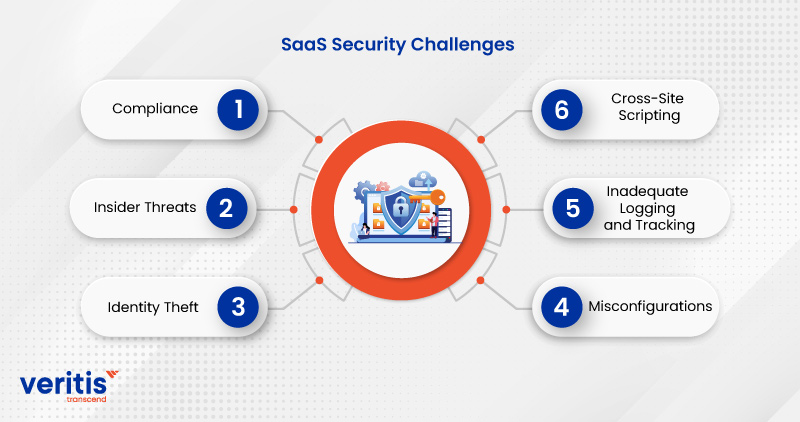
Vulnerabilities and concerns of data breaches are among the SaaS security risks that cost companies millions annually. Threats to cloud services are multiplying at an accelerated rate. Organizations that use cloud storage rely on a third-party supplier for security and make their data accessible through the Internet.
1) Compliance
Every industry has specific security and auditing requirements, and noncompliance can result in financial or legal consequences. In addition, depending on their sector and the kind of data they retain and process, many organizations are subject to laws like GDPR, PCI-DSS, HIPAA, and SOX.
These standards include specifications for conducting security testing, performing routine audits, and protecting data in the cloud. Protecting sensitive data is a top issue, so you must monitor your SaaS apps and provide the necessary logs and audit trails.
2) Insider Threats
SaaS apps and the companies employing them may be exposed by careless staff members and nefarious insiders who intentionally or unintentionally leak data. Any data stored in the cloud is at risk for security breaches, primarily if you use weak passwords and shared login information. In addition, SaaS application development security problems frequently result from sharing data externally or making it open to access from all platforms.
3) Identity Theft
SaaS products regularly use online payment techniques that increase identity theft risk. Lightweight Directory Access Protocol (LDAP), firewalls, and data encryption in transit and at rest are just a few security measures needed to secure payment card information and user identity.
Directory protocols alone do not prevent identity theft. Authentication resistant to phishing, payment data safeguards, session controls, and monitoring for account misuse are also necessary.
4) Misconfigurations
Inadequate security settings can leave computing resources open to hostile activities. According to the Open Web Application Security Project (OWASP), misconfigurations are the most frequent security vulnerability. Therefore, to protect SaaS applications, it is essential to ensure that all cloud-based tools are correctly configured and updated on schedule.
Establish approved tenant configurations, restrict unnecessary access, and monitor settings for changes. Do not assume default settings meet enterprise requirements.
5) Inadequate Logging and Tracking
Electronic audit logs are crucial for identifying fraudulent or unauthorized activities, yet many companies neglect to implement or monitor them in time to detect risks. To locate and stop breaches, you should establish enough monitoring across your apps and frequently review the logs.
6) Cross-Site Scripting
In an XSS attack, malicious code is injected into web pages that end users view. It impacts the majority of apps and is the second most frequent security vulnerability. The most recent versions of Ruby on Rails or React JS can automatically block XSS.
Frameworks such as Ruby on Rails and React provide protections for common rendering patterns, but they do not automatically prevent every XSS vulnerability. Developers must use secure coding practices and test how the application handles untrusted content.
Useful link: 12 Best Features for Work Management Software That Matter Most
What Are the Security Risks in a Multitenant Architecture?
Multitenancy is not inherently insecure. Risks arise when an application fails to enforce customer boundaries across data, APIs, background processes, and administrative functions. Common areas to assess include:
1) Tenant authorization: Verify that users can access only records belonging to their organization.
2) Shared storage and caching: Check that database filters, cache keys, exports, and search indexes do not expose another tenant’s information.
3) Support access: Restrict, approve, and audit provider administrator access to customer environments.
4) Shared resource disruption: Review the provider’s isolation and capacity controls for incidents that could affect multiple tenants.
5) Integration permissions: Limit API tokens and connected applications to the data and actions they need.
Customers should ask suppliers how they test tenant isolation, control support access, and investigate boundary failures. Providers should test separation across APIs, exports, and background jobs, not only through the user interface.
8 SaaS Security Best Practices to Secure Applications

1) Monitoring and Logging
Record all successful and unsuccessful access attempts to the SaaS company system. Any changes to data have the same effect. This action is crucial for preventing data breaches and setting up future security plan arrangements.
Centralize SaaS audit events alongside identity provider logs so investigators can connect sign ins, privilege changes, integration grants, and sensitive exports. Confirm that logs include the actor, action, affected resource, timestamp, and outcome, and that the security team receives and reviews them.
2) Data Encryption
Cloud apps must rely on data encryption and key management because they cannot be secured using conventional techniques like firewalls. Many clients prefer to manage their keys through a nearby hardware facility because they are uncomfortable leaving this crucial task in the hands of data vendors.
Use Transport Layer Security (TLS) to protect data in transit. Transparent Data Encryption (TDE), where supported by the underlying database, protects stored database data, not network traffic. Confirm how the provider protects stored data, backups, and encryption keys.
Encryption also has limits. Reports, downloaded spreadsheets, synchronization folders, and connected applications can create copies outside the original SaaS environment. Apply access and retention controls to those copies as well.
3) Identify and Map Your SaaS Data
SaaS security professionals’ top goals are secure discovery, tagging-based classification, mapping, and monitoring of all data in use, transit, or at rest. SaaS developers must know, monitor, and secure their unmanaged and SaaS cloud security shadow data. The data navigation process depends on understanding where data is at all times and ensuring the highest protection level.
Build an application inventory that records each application’s owner, business purpose, data categories, criticality, integrations, and supplier dependencies. Include employee adopted applications that procurement records may miss. Map the data journey through uploads, processing, integrations, exports, archives, and deletion.
4) Better Authentication
Deciding how users should be granted access to SaaS services is challenging because SaaS cloud security providers can handle authentication in multiple ways. Vendors do not universally support integration with customer-managed identity providers such as Active Directory (AD) with Security Assertion Markup Language, Open Authorization, and OpenID Connect.
Some vendors support multifactor authentication, while others do not. Security teams should understand which services are in use and what authentication options each supports. When available, single sign on (SSO) linked to AD can help align account and password policies.
OAuth primarily governs delegated authorization. It should not be treated as an authentication protocol on its own. For sensitive access, require multifactor authentication and consider phishing resistant methods such as passkeys or FIDO2 security keys, where supported. Check whether local accounts or account recovery paths can bypass centralized controls.
5) Effective Identity and Access Management Controls
IAM (identity and access management) technologies substantiate users’ identities. Integrating with IAM tools is essential for SaaS consumers. Business users do not want to use a different password when logging into a different area of an enterprise-wide platform. Therefore, any IAM system must include sophisticated access control to identify who accessed what and when.
Apply least privilege throughout the identity lifecycle. Assign permissions by role, separate administrator accounts from everyday accounts, and remove access when it is no longer needed. Review access when employees change roles, not only when they leave.
Govern nonhuman identities as carefully as employee accounts. Inventory service accounts, API keys, OAuth grants, and automation credentials. Assign an owner to each, restrict permissions, rotate or expire credentials where supported, and remove unused integrations. See Veritis Identity and Access Management Services.
6) Maintain Visibility
Track all SaaS usage, evaluate security logs from the service provider, and analyze information from security tools like CASBs. Just as for any corporate program, a high level of security is required for SaaS implementation solutions. Therefore, ensure your security and IT staff are aware of this. In addition, incorporate monitoring into your risk management plan to ensure users handle SaaS applications safely.
Reconcile identity provider records, procurement information, application discovery tools, and employee reported applications to identify unmanaged SaaS use. Reporting should show unowned applications, sensitive data exposure, overdue findings, and the business teams responsible for remediation.
7) SaaS Security Posture Management (SSPM)
SaaS Security Posture Management (SSPM) assesses supported SaaS tenant settings, permissions, and related exposures against defined security policies. It helps teams identify configuration drift across connected applications. Its effectiveness depends on provider coverage, available APIs, and the quality of the organization’s security baselines. Findings still need accountable owners and remediation.
SSPM and CASB capabilities can complement each other. SSPM primarily assesses the security posture inside SaaS tenants, while a CASB typically supports cloud usage visibility and policy enforcement over access or data movement. Neither replaces identity governance, incident response, or supplier oversight.
8) Implement a Security First Software Development Life Cycle
A security focus is added to the software development process by employing a safe, security-prioritized software development life cycle (SDLC). Further enhancing the SDLC’s security profile is threat modeling and penetration testing.
For SaaS providers, this approach protects the application itself. For enterprise customers, it applies to custom integrations, extensions, automation, and internally developed applications that connect to SaaS platforms. Define security requirements before development, test API authorization across users and tenants, protect code repositories and build systems, and retest after fixes. DevSecOps practices can help connect security controls to everyday delivery.
How Can You Strengthen a SaaS Security Framework?
A SaaS security framework connects business risk to repeatable controls, named responsibilities, and measurable evidence. Begin with the business services that depend on SaaS, the information they process, and the consequences of losing access or exposing data. Assign application, security, and operational owners.
Assess suppliers before onboarding and after material changes. Review assurance evidence, incident notification commitments, subprocessors, data location options, security capabilities, and exit processes. Set minimum controls according to application risk. If a platform cannot support a required control, document the gap and determine whether compensating measures are adequate.
Define response steps for a compromised account, malicious integration, unintended public sharing, and provider outage. Confirm who can revoke access, preserve evidence, contact the supplier, and coordinate legal or regulatory review. Provider resilience does not always provide the record level restoration or recovery timing the business needs. Review business continuity planning alongside SaaS recovery requirements.
A practical validation checklist should confirm that each critical application has a named owner, approved authentication, least privilege access, known integrations, appropriate data controls, usable security logs, and tested recovery procedures. Record the evidence, accountable team, and date for reassessment.
How Do You Create an Effective SaaS Security Checklist?
An effective SaaS security checklist pairs each control with an accountable owner, evidence of implementation, and a trigger for reassessment. Use the checklist below as a starting point, then adapt it to the application’s sensitivity, business criticality, and available capabilities.
| Control area | What should be verified? | Evidence to retain | Typical accountable team |
| Application inventory | Every approved application has an owner, purpose, data classification, and risk rating | Inventory record and approval | IT and business owner |
| Supplier assurance | The review covers relevant services, exceptions, subprocessors, and notification obligations | Assessment, assurance reports, and contract | Security, procurement, and legal |
| Authentication | Required users and administrators use approved SSO and authentication controls | Policy configuration and enrollment report | Identity team |
| Access management | Roles follow least privilege and access is removed when no longer needed | Access review and offboarding test | Identity team and application owner |
| Nonhuman identities | API keys, service accounts, and OAuth grants have owners and appropriate permissions | Credential inventory and scope review | Application and integration teams |
| Data protection | Classification drives sharing, retention, encryption, and deletion | Data map and control settings | Data owner and security |
| Tenant posture | Baselines cover sharing, privileged roles, logging, and integrations | Configuration assessment and exception register | SaaS administrators and security |
| Monitoring | Relevant events reach the monitoring team and detections have owners | Sample events, alert tests, and retention settings | Security operations |
| Secure development | Custom code and integrations undergo appropriate security testing | Review records, test results, and remediation evidence | Engineering and security |
| Incident response | Teams can contain account, session, integration, and data exposure incidents | Playbooks and exercise results | Security operations and incident leadership |
| Recovery and exit | Data and configurations can be restored or exported within business requirements | Restore tests, export validation, and exit plan | Application owner and continuity team |
Case Study: SaaS Security Enhancement for a Wellness Platform
A fast-growing fitness and wellness platform, with a proactive approach to data security, partnered with Veritis to enhance the security of its SaaS-based services amidst increasing concerns over data privacy and platform integrity. The client operated in a highly data-driven environment, facing challenges such as inconsistent access controls, limited threat detection, and gaps in regulatory compliance.
Veritis implemented a robust cybersecurity framework tailored to SaaS environments, introducing multi-layered security controls, identity and access management (IAM), and real-time monitoring. By aligning with industry standard best practices, such as zero-trust architecture and secure DevOps, the platform significantly reduced risk exposure and built greater trust with its user base.
This transformation demonstrates how adopting SaaS security best practices, including centralized visibility, access control, and continuous monitoring, can proactively safeguard applications while supporting business scalability and growth.
Read the full case study: Cybersecurity Transformation for a Wellness Platform.
Conclusion
As SaaS development teams navigate the ever-evolving digital landscape, the importance of incorporating the best security practices into their applications cannot be overstated. Robust Cybersecurity Solutions are not just essential, but a necessity to ensure user security and the smooth operation of the organization.
Veritis, a Stevie Award winner, has extensive expertise in creating secure SaaS applications for both Fortune 500 companies and startups. We have been a key partner in the digital transformation journey of numerous organizations and individual entrepreneurs, helping them turn their SaaS concepts into a digital reality.