Cloud migration has moved into the boardroom because its financial impact is greater than its technical impact. When enterprises plan legacy infrastructure for cloud migration, leadership is accountable for ROI, business continuity, and operating efficiency. The executive question is not all about what is cloud migration? Which cloud application migration tools can modernize core systems without creating new cost exposure or operational instability? Veritis helps organizations treat migration as an investment decision governed by performance metrics, not vendor promises.
The enterprise environment adds another layer of pressure. CIOs and CFOs must evaluate cloud application migration tools against uptime commitments, regulatory requirements, and global scale. The best cloud migration tools protect production environments while accelerating transformation. Veritis works with executive teams to link migration decisions to measurable outcomes, ensuring modernization supports growth rather than introduces disruption.
Leadership teams also understand that cloud migration risks and challenges are real. They translate directly into revenue impact, customer trust, and brand credibility. This is why enterprises rely on structured best cloud migration services and experienced cloud migration consulting, with support continuing through the post migration period. Veritis delivers that continuity, giving executives a controlled path to scale without sacrificing stability.
Begin Your Cloud Migration Journey
What Are Cloud Migration Tools and Why Do You Need Them?
Cloud application migration tools are platforms that manage the movement of applications, data, and workloads from on premises environments to the cloud. They are not only built for speed. They exist to protect stability, maintain visibility, and ensure the migration delivers predictable business value.
A) What They Actually Do Inside an Enterprise?
Instead of treating migration as a manual engineering effort, cloud migration automation tools and cloud application migration tools orchestrate discovery, transfer, validation, and rollback. This is how enterprises safely scale migrations across AWS, Azure, and Google Cloud migration tools without exposing production systems.
B) Why Executives Care?
Migration errors translate directly into lost revenue and operational disruption. The best cloud migration tools are designed to mitigate risks and reduce challenges before they impact customers. When supported by structured best cloud migration services, expert cloud migration consulting services, and cloud migration support, migration becomes a governed investment. Veritis delivers this as an enterprise program, ensuring that transformation improves performance rather than destabilizes it.
Useful link: What is Cloud Migration? Strategy, Process, and Tools
How to Choose the Right Cloud Migration Platform?
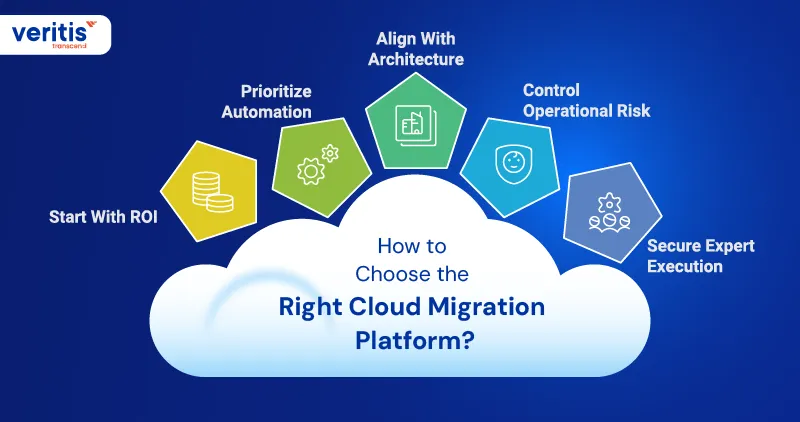
1) Start With ROI
A) Measure Financial Exposure
Cloud migration software must protect revenue during the transition from local systems to the cloud. Executives should evaluate tools based on downtime tolerance, stabilization speed, and impact on operating costs. The best cloud migration tools reduce transition risk while accelerating time to value.
B) Tie Tools to Outcomes
Software selection should connect directly to business KPIs. Migration platforms that improve predictability and reduce recovery spend deliver a higher ROI than tools focused solely on transfer speed.
2) Prioritize Automation
A) Standardize Execution
Enterprise scale migration depends on repeatable workflows. Mature cloud migration automation tools and cloud application migration tools reduce human error and enforce governance across environments.
B) Increase Visibility
Automation should not remove oversight. Leadership needs audit trails, validation checkpoints, and rollback control to contain cloud migration risks before they affect production systems.
3) Align With Architecture
A) Support Your Cloud Path
Software must integrate natively with the target ecosystem. Enterprises choosing AWS cloud migration tools, Azure Cloud Migration tools, or multi cloud migration tools strategies should avoid tools that introduce architectural friction.
B) Preserve Scalability
The platform should support future expansion, not initial transfer. Poor alignment increases cloud migration challenges and operating complexity.
4) Control Operational Risk
A) Protect Live Workloads
Executives should assess how tools safeguard data integrity and workload performance. Migration success is measured by continuity, not speed.
B) Strengthen Governance
The best platforms embed compliance controls and testing safeguards that reduce operational exposure during transition.
5) Secure Expert Execution
A) Combine Tools and Expertise
Technology alone does not guarantee success. Structured best cloud migration services and experienced cloud migration consulting services are critical to disciplined execution.
B) Ensure Long Term Support
Sustained cloud migration support helps stabilize environments after going live. Veritis integrates tooling, governance, and expert oversight so migration becomes a managed enterprise capability.
Useful link: 5 Reasons for successful On Premise to Cloud Migration
Key Features Every Cloud Migration Tool Should Offer
1) Discovery
A) Inventory at Scale
- Auto discover servers, apps, and dependencies to build a complete migration scope, not a partial one
- Support both agent based and agentless discovery so teams can move fast without disrupting production
B) Dependency Clarity
- Dependency visualization that shows what talks to what, so migrations do not break critical workflows
2) Assessment
A) Readiness and Sizing
- Readiness scoring and proper sizing recommendations to avoid over provisioning and improve ROI
B) Business Case Signals
- Cost and impact insights that help executives compare options across AWS cloud migration tools and Azure cloud migration tools
3) Execution
A) Replication and Reduce Control
- Continuous replication options that minimize downtime and support controlled transitions for enterprise workloads
- Clear rollback and restart paths so incidents do not become outages
B) App Level Orchestration
- Grouping servers into applications and tracking progress at the app level, not only the server level. This is critical for cloud application migration tools used in portfolio moves
4) Automation
A) Repeatable Migration Factory
- Workflow automation that standardizes waves, approvals, validations, and post move checks. This is what separates cloud migration automation tools from manual scripts
B) Integration Hooks
- APIs and integration points so the migration engine connects to ITSM, CMDB, security, and monitoring workflows
5) Visibility
A) Central Tracking
- A single view to track migrations, statuses, and progress across teams and applications, especially when using AWS cloud migration tools at scale
B) Audit Trail
- Evidence and logs that support compliance and executive reporting
6) Data Integrity
A) Low Downtime for Databases
- Built in database migration capabilities that support minimal or near zero downtime patterns where feasible
7) Multi Cloud Readiness
A) Real Multi Cloud Support
- Ability to migrate from varied sources and run consistent execution across environments, which is essential for multi cloud application migration tools in enterprise portfolios
8) Risk Controls
A) Reduce Cloud Migration Risks
- Built in dependency mapping, validation gates, and rollback reduce operational exposure during the transition
B) Handle Cloud Migration Challenges
- Tools that combine discovery, assessment, and governed execution reduce timeline slippage, surprise dependencies, and post move instability
When executives evaluate cloud application migration tools, prioritize platforms that deliver dependency accuracy, controlled replication, app level orchestration, and governance grade reporting across AWS, Azure, and Google Cloud migration tools.
Useful link: 10 Key Security Considerations for Cloud Migration and Implementation
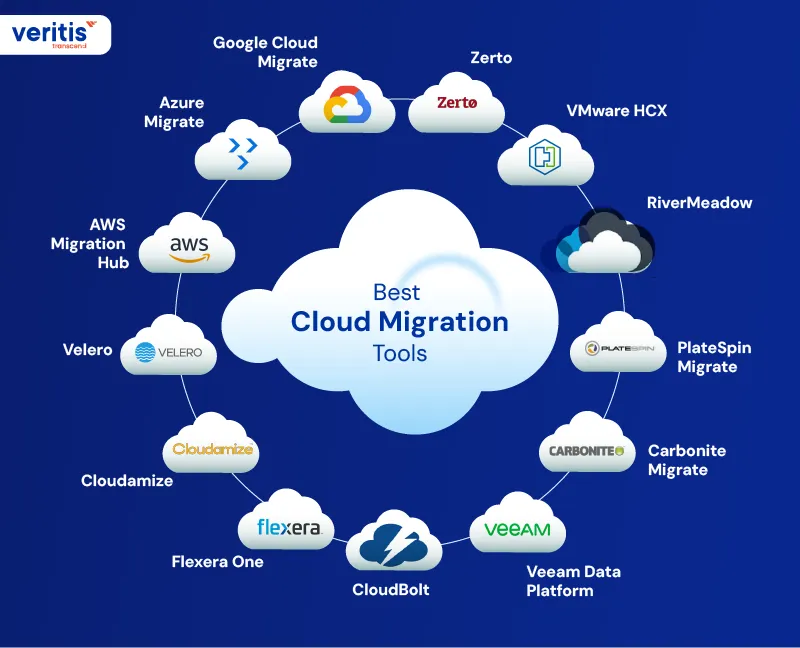
Best Cloud Migration Tools
1) AWS Migration Hub
A) Best Use
- Executive tracking layer for large on premise to cloud migration automation tools
- Portfolio visibility across multiple migration activities and teams
B) Pros
- Centralized progress reporting, which improves governance and reduces coordination waste
- Automation capability can be used at no additional charge, with costs tied to the underlying services consumed
C) Cons
- Total cost depends on the underlying migration services and cloud resources used, not the hub itself
- Best results require clean application grouping and disciplined reporting; otherwise, dashboards become noisy
D) Pricing
- Some capabilities offer free environment hours for a limited period; pay as you use applies beyond that, and for resources consumed
- Practical note for ROI: budget for associated compute, storage, and network during replication, testing, and cutover
2) Azure Migrate
A) Best Use
- Assessment plus migration hub for enterprise server moves, especially when executives want cost and readiness clarity early
B) Pros
- Server migration charges are free for the first 180 days per machine, which helps in staged waves
- Strong discovery and assessment posture for planning and controlling Cloud Migration Challenges before execution
C) Cons
- After 180 days, replicated instances incur a monthly charge, so long running projects need tight wave governance
- Despite the free window, storage, storage transactions, and replication related data transfer may continue to generate charges
D) Pricing
- Free for the first 180 days for each replicated server, then $25 per month per replicated instance
- Expect additional charges tied to storage and data transfer during replication
3) Google Cloud Migrate
A) Best Use
- VM rehosting programs where you want a structured move with minimal tooling license cost
- Works well alongside planning and assessment through the Migration Centre for portfolio decisions
B) Pros
- Migration service is provided at no charge for migrations into Google Cloud migration tools, which helps ROI cases
- You still get structured replication based moves with controlled testing and cutover options
- Migration Centre supports cost estimation and planning, which strengthens executive business cases
C) Cons
- While the migration service is free, you will pay for consumed cloud resources such as compute, storage, and networking during testing and validation
- If you do not manage test cycles and cutover waves tightly, consumed resources can dilute ROI
D) Pricing
- Migration service: no charge for migrations into Google Cloud
- Paid components: compute, storage, and network resources used for testing, validation, and running workloads
4) Zerto
A) Best Use
- Fast workload mobility and near continuous replication when downtime risk is expensive
B) Pros
- Strong for tight RPO and fast recovery patterns
- Works well when you want migration plus resilience in one motion
C) Cons
- Cost can scale quickly with protected workload count
- Requires disciplined design to avoid overprotecting low value apps
D) Pricing
- Subscription licensing is commonly per protected VM or instance (reseller examples show per VM subscription SKUs)
5) VMware HCX
A) Best Use
- VMware estates can be migrated with minimal refactoring, especially during on premise to cloud migration automation tools
B) Pros
- Built for workload mobility and migration between environments
- Licensing and packaging provide advanced and enterprise editions
C) Cons
- VMware footprint required
- Not the best fit for cloud native application re platforming
D) Pricing
- Licensed by edition with subscription support requirements; also bundled in some offerings (example: included for specific VMware solution customers)
Accelerate Your Cloud Migration
6) RiverMeadow
A) Best Use
- Automated wave based workload migration and modernization across hybrid and multi cloud
B) Pros
- Strong automation and operational scale claims for large portfolios
- Positioned for hybrid and multi cloud execution
C) Cons
- Less transparent public pricing
- Best results usually require a defined factory approach and governance
D) Pricing
- Often sold as fixed price migration services or quote based platform pricing depending on scope (per VM service positioning is common)
7) PlateSpin Migrate
A) Best Use
- Server workload moves when you need controlled, repeatable migrations without changing the application.
B) Pros
- Licensing model is per workload and supports repeated migrations once assigned
- Useful for structured migration waves in enterprise programs
C) Cons
- More infrastructure centric than app modernization centric
- Requires careful sequencing for complex dependencies
D) Pricing
- Subscription SKUs exist for 1 server workload migration (example reseller listing)
8) Carbonite Migrate
A) Best Use
- Low disruption server migration and workload portability across environments
B) Pros
- Positioned for migrating workloads between physical, virtual, and cloud with minimal downtime focus
- Useful when outage windows dominate the risks of cloud migration automation tools
C) Cons
- Pricing is typically not self serve and varies by environment
- Vendor and reseller packaging can differ
D) Pricing
- Commonly quoted; subscription license bundles and short term subscription SKUs are available via resellers
9) Veeam Data Platform
A) Best Use
- Migration programs where recovery assurance, backup portability, and post move confidence drive ROI.
B) Pros
- Clear purchasing paths, including free community editions and multiple ways to buy
- Strong fit when cloud migration automation tools support and recoverability are executive requirements
C) Cons
- Primarily a data protection leader, not a single click migration engine
- Needs integration into your best cloud migration services operating model
D) Pricing
- Multiple purchasing and pricing options are offered through official buying paths; costs depend on edition and consumption model
10) CloudBolt
A) Best Use
- Automation and governance across hybrid and multi cloud environments, especially when the primary ROI lever is standardization.
B) Pros
- Positioned to automate provisioning and enforce policy across complex environments
- Helpful cloud migration automation tools layer that reduces manual toil
C) Cons
- Not a pure migration engine, it is an orchestration and control plane
- Value depends on process maturity and integration with ITSM
D) Pricing
- Market listings indicate starting price visibility on software marketplaces, with enterprise pricing typically scoped by vendor
11) Flexera One Cloud Migration and Modernization
A) Best Use
Planning and assessment when you need defensible TCO inputs and dependency driven sequencing
B) Pros
- Designed for cloud migration planning and workload assessments with provider comparison intent
- Strong for executive business cases and prioritization, before execution starts
C) Cons
- It is not the mover itself; it strengthens decision quality and sequencing
- Requires good source inventory quality for best results
D) Pricing
- Typically contract based in marketplaces and enterprise sales models
12) Cloudamize
A) Best Use
- ROI driven migration assessment and cost modelling, especially early in an AWS Cloud Migration strategy
B) Pros
- Positioned as an independent tool for TCO analysis and migration assessment
- Feature sheets highlight what if scenarios and pricing plan modelling to refine the migration roadmap
C) Cons
- Assessment tools do not replace execution discipline
- Requires accurate telemetry collection to avoid optimistic models
D) Pricing
- Marketplace listings support private offers and contract pricing approaches
13) Velero
A) Best Use
- Kubernetes resource and volume migration patterns, especially for cloud native workloads
B) Pros
- Open source tool designed to back up, restore, and migrate Kubernetes resources and persistent volumes
- Useful when cloud application migration tools must cover container platforms, not VMs
C) Cons
- Enterprise scale needs careful operationalization, security controls, and testing rigor
- Feature depth varies by plugin and environment design
D) Pricing
- Open source distribution is free to use; commercial support is typically handled via vendors or partners, depending on your stack
To choose the best cloud migration tools for your enterprise, match tools to the primary risk:
- If Cloud Migration Risks are dominated by downtime, prioritize replication and controlled cutover tooling
- If Cloud Migration Challenges are dominated by complexity, prioritize assessment, plus automation and governance
- If you are running Azure Cloud Migration tools or broader multi cloud automation tools, keep one control layer that standardizes waves and reporting across teams
Useful link: Azure Cloud Migration Services: A 4 Step Strategy
Conclusion
Cloud migration success is not defined by how fast workloads move. It is defined by how predictably enterprises protect revenue, stabilize operations, and scale after the transition. The best cloud migration tools are the ones that reduce uncertainty. They create visibility, enforce governance, and transform migration from a disruptive event into a controlled business program.
Executives who achieve the highest ROI treat tooling as one layer of a larger strategy. They combine cloud migration automation tools with disciplined execution, structured best cloud migration services, and cloud migration support. This is how organizations mitigate cloud migration risks, navigate migration challenges, and convert infrastructure changes into measurable performance gains.
Veritis helps enterprises operationalize that strategy. By aligning tool selection with financial outcomes, governance frameworks, and expert cloud migration consulting services, migration becomes repeatable, scalable, and defensible at the board level. The result is not a successful move to the cloud. It is a stronger operating model built to support growth.