
Table of contents
In the modern digital economy, deployment frequency is all about a predictor of market dominance. The State of DevOps Report reveals a stark reality: elite performers deploy code 2,555 times more frequently than their lower performing counterparts, while achieving 99.9% system availability versus 98.5% for average organizations. This translates to $3.2M in annual revenue advantage for enterprises with superior deployment capabilities.
Yet 65% of enterprises struggle with inconsistent deployment processes, resulting in:
- 4.2 hours monthly downtime per enterprise
- $2.4M average security incident cost
- 35% slower time to market for features
- $12M to $45M annual infrastructure waste
For US tech executives managing the best configuration management tools in DevOps, choosing between Chef vs Puppet vs Ansible represents a $2M to $15M business decision with lasting implications for agility, security, and market competitiveness.
The Complexity Challenge
Modern enterprise infrastructure complexity demands robust DevOps automation tools:
- 73% operate in hybrid cloud environments with 3+ providers
- Microservices adoption increased server count from 8 to 15x
- Compliance frameworks expanded from 3 to 5 to 12 to 25 simultaneously
Without proper Chef config management, Puppet orchestration, or Ansible automation, organizations face $500K to $2M annual technical debt and 45% increased security vulnerabilities.
The choice between Chef Puppet or Ansible solutions is not purely technical; it’s strategic. It determines your ability to compete in an automated, security conscious marketplace where the best configuration management tools create sustainable competitive advantages.
Get a Secure DevOps Assessment
What Challenges Do Enterprises Face With Infrastructure Automation?
CIOs and CTOs are under pressure to deliver scalable, secure, and agile IT environments. Manual infrastructure provisioning introduces risks, delays, and inconsistencies. However, the potential of Infrastructure as Code (IaC) tools, such as Chef, Puppet, and Ansible, to mitigate these challenges is hopeful. The question then becomes, which of these tools is the right fit for your organization?
According to Global Newswire, the global DevOps market is projected to reach USD 12.2 billion by 2026 with a CAGR of 18.95%. With 77% of organizations adopting or planning to adopt DevOps (according to Google Research), selecting the right DevOps automation tool is crucial for enabling business agility.
What is Chef in DevOps and Why Do Enterprises Use It?
Chef is a DevOps tool for configuration management. It enables automation and testing, streamlining infrastructure deployment through code. It employs a client server architecture and is compatible with various platforms, such as Windows, Ubuntu, CentOS, and Solaris. Additionally, the Chef automation tool integrates with popular cloud platforms, including AWS, Google Cloud Platform, and OpenStack. Before delving into Chef in detail, it’s essential to grasp the concept of configuration management.
Configuration Management
Consider a scenario where you’re a systems engineer within an organization tasked with deploying or updating software and operating systems on hundreds of systems daily. While this can be accomplished manually, it often leads to multiple errors, potential software crashes during updates, and no straightforward way to revert to previous versions. Configuration Management tools in DevOps play a crucial role in addressing these challenges.
Configuration Management involves a comprehensive record of an organization’s software and hardware information. It also automates tasks such as repairs, deployments, and updates across the entire application landscape. Configuration Management assumes the responsibilities of numerous system administrators and developers who manage multiple servers and applications. Some tools commonly used for Configuration Management include Chef, Puppet, Ansible, CFEngine, and SaltStack.
Why Should C-Suite Leaders Consider Chef for Infrastructure Automation?
Consider a scenario where your office relocates to a different environment, and the task at hand is to have your system administrator install, update, and deploy software on hundreds of systems overnight. When this process is carried out manually, it’s susceptible to human errors, potentially leading to software malfunctions. This is where Chef automation tools come into play as powerful automation tools that translate infrastructure into code.
Chef streamlines application configuration, deployment, and management automation across the network, whether in a cloud or hybrid environment. It is an asset for expediting application deployment and enhancing software development speed, which denotes how rapidly software can adapt to new requirements or changing conditions.
What Are the Key Features of Chef for Managing Complex IT Environments?
1) Effortless Management of Numerous Servers With Minimal Staffing: The Chef efficiently manages many servers with a small team of employees.
2) Compatibility With Various Operating Systems: Chef is compatible with multiple operating systems, including FreeBSD, Linux, Windows, and more.
3) Infrastructure Blueprint Maintenance: The Chef maintains a comprehensive blueprint of the entire infrastructure, ensuring visibility and control.
4) Seamless Integration With Major Cloud Service Providers: It seamlessly integrates with leading cloud service providers, enhancing its versatility and adaptability.
5) Centralized Management: Chef offers centralized management capabilities. A single Chef server is the hub for deploying policies and maintaining consistency across the infrastructure.
Useful link: Things CTO Needs to Consider Selecting a Cloud Network Security Solution
How Does Chef Improve Service Delivery and Operational Efficiency?
1) Streamlining Software Delivery: When you automate your infrastructure with Chef, software related tasks such as testing and creating new environments for software deployments become significantly faster.
2) Enhanced Service Resilience: Automation through Chef enables proactive monitoring for bugs and errors, helping to prevent issues before they occur and facilitate quicker recovery from errors when they do occur.
3) Risk Mitigation: The Chef plays a crucial role in reducing conflicts throughout the development and production environments, thus lowering risks and enhancing compliance throughout the deployment process.
4) Cloud Readiness: Chef seamlessly adapts to cloud environments, simplifying the configuration, installation, and automatic management of servers and infrastructure in cloud based setups.
5) Centralized Management: Chef’s versatility allows you to manage both your on-premise and cloud based platforms, providing a unified approach to handling data centers and cloud environments.
6) Streamlined IT Operations and Workflows: Chef offers a continuous deployment pipeline that spans from building and testing to delivery, monitoring, and troubleshooting, helping to streamline IT operations and workflows.
What Are the Challenges or Limitations of Using Chef in Enterprise IT?
1) Steep Learning Curve: Chef has a significant learning curve, which may challenge newcomers to the platform.
2) Complex Initial Setup: The initial setup process can be intricate and demanding, requiring careful configuration and planning.
3) Absence of Immediate Actions on Change: The Chef cannot execute immediate actions on changes, as it primarily follows a pull based process that adheres to predefined schedules.
Why C-Suite Leaders Should Consider Chef?
- Offers seamless compatibility with leading cloud services, including AWS, Microsoft Azure, and Google Cloud Platform.
- Suitable for hybrid environments
- Supports enterprise level scale
- Enables rapid and consistent application delivery
Key Benefits:
- Centralized management
- Blueprint maintenance for infrastructure
- Streamlined CI/CD workflows
- Automated recovery and proactive monitoring
Considerations:
- Complex to set up and operate
- Steep learning curve
- Pull based configuration only
What is Puppet and How Does It Streamline Enterprise Configuration Management?
Puppet is an effective system management tool that streamlines and automates configuration management.
It serves multiple purposes:
- Puppet functions as a software deployment tool.
- It offers open source configuration management for server configuration, management, deployment, and orchestration.
- Puppet is tailored for the configuration management of Linux and Windows systems.
- It is crafted in Ruby and utilizes its unique Domain Specific Language (DSL) to define system configurations.
Configuration management involves maintaining software and computer systems (including servers, storage, and networks) in a known, desired, and consistent state. Additionally, it provides access to an accurate historical record of system states, which is valuable for project management and auditing.
In the market, you’ll find two primary versions of Puppet:
1) Open Source Puppet: This version is the primary iteration of the Puppet configuration management tool. It operates under the Apache 2.0 license and can be downloaded from Puppet’s official website.
2) Puppet Enterprise: This paid version, specially designed for enterprises, offers robust node management capabilities. It includes compliance reporting, orchestration, role based access control, a graphical user interface (GUI), API support, and command line tools for effective node management.
Configuration Management
Configuration management is a systematic approach to implementing necessary changes in a system to maintain its long term integrity. It achieves this without relying solely on the developers’ knowledge, ensuring a deterministic representation of the current system’s design and build state. Effectively recording the system’s state simplifies the auditing process. Configuration management addresses the following challenges:
1) Reverting to Previous Versions: Configuration management allows successful reversion to a prior, stable component version when an incorrect or skewed new component version is introduced.
2) Adapting to Changing Requirements: It facilitates determining which components must be modified when system requirements change, ensuring that the system remains aligned with evolving needs.
3) Recreating Implementations: When requirements have evolved significantly since the last implementation, configuration management enables the efficient redoing of the implementation to align with the updated requirements.
Useful link: DevOps Configuration Management: A Guide to the Top Tools in the Field
How Does Puppet Work in a Large Scale Enterprise Environment?
The Puppet workflow follows a straightforward process. At its core is the Puppet master, which serves as the central server housing configuration data for various nodes it manages through manifests. Puppet agents are installed on these nodes and collect node specific information using facts. These facts are sent back to the Puppet master.
As part of the Puppet software configuration management approach, the master uses all the gathered data to construct a catalog outlining node configurations. Subsequently, the Puppet master dispatches these catalogs to the agents. Agents utilize these catalogs and the information they collect to implement configuration changes on their respective nodes. After making these updates, agents report them to the Puppet master.
Which Features of Puppet Make It Suitable for Regulated Industries?
1) Declarative Language: Puppet uses a declarative language for defining configurations, making it easy to specify the desired state of systems without specifying the steps to achieve it.
2) Cross Platform Compatibility: Puppet is platform agnostic and can manage configurations across various operating systems, simplifying multi platform infrastructure management.
3) Centralized Configuration Management: Puppet centralizes configuration information on a Puppet controller server, allowing efficient management of configurations for multiple nodes from a single location.
4) Resource Management: Puppet manages system resources (e.g., files, packages, services) and ensures they remain desired, providing consistency and reliability.
5) Extensibility: Puppet can be extended through custom modules and plugins, enabling users to adapt it to their specific configuration and automation needs.
How Does Puppet Help Improve Consistency and Compliance?
1) Efficient Automation: Puppet offers significant advantages in terms of automation. One notable feature is its ability to automate operating system management on remote machines, eliminating the need for manual intervention when deploying new versions or updates. This automation streamlines processes, reducing the potential for human error.
2) Accelerated Deployment: Automation greatly enhances deployment speed, relieving network engineers from time consuming tasks. Without automation, changes could take days or even weeks to implement due to complex manual processes. Puppet’s automation capabilities expedite deployment, freeing time for other essential tasks, such as software development and client interactions.
3) Ease of Use: Puppet is designed to be user friendly, making it accessible to administrators. While it simplifies many tasks, technical support can resolve issues and provide guidance. Leveraging Puppet’s technical support can prevent costly mistakes and ensure quick issue resolution, saving time and money.
4) Consistency and Standardization: Puppet enforces consistency in system configurations, reducing the risk of compatibility issues arising when each specialist writes code according to their style. This standardization enhances system reliability and stability.
5) Scalability: Puppet scales effectively, making it suitable for managing configurations across large and complex infrastructures. Whether you have a handful of servers or a vast network, Puppet can adapt to your needs.
Useful link: All You Need to Know About DevSecOps and its Implementation
What Are the Risks and Drawbacks of Using Puppet for Automation?
1) Puppet Server Vulnerability: Puppet’s centralized nature also presents drawbacks, with server security being a primary concern. If malicious actors access the Puppet server, they can manipulate client operating systems, potentially issuing commands to encrypt or delete data. The consequences of such breaches can be immeasurable. Implementing modern security mechanisms to safeguard the server against external threats is crucial to mitigate this risk, with a strong emphasis on adhering to fundamental information security principles.
2) Administrator Expertise: Effectively maintaining extensive networks demands highly skilled and attentive administrators. For instance, a simple mistake when configuring a system file, if not thoroughly checked, can have widespread negative repercussions across multiple servers simultaneously. While it’s possible to revert systems to their previous configurations, any downtime or data loss can result in financial setbacks for the organization. Moreover, ensuring network specialists possess the necessary training and qualifications may incur substantial costs.
Why Puppet Appeals to IT Executives?
- Ideal for regulated industries
- Enhances compliance and reporting
- Enables repeatable system state enforcement
Key Benefits:
- Strong automation capabilities
- Configuration standardization
- Rapid deployments
- Easy scalability
Considerations:
- Requires high administrator expertise
- Vulnerable if Puppet server is compromised
What is Ansible, and why is it a Top Choice for Agile IT Automation?

Ansible is an open source, cross platform automation tool for DevOps professionals. It automates resource provisioning and is widely employed to deliver continuous software code through “infrastructure as code”.Leveraging Ansible configuration management for infrastructure automation, teams can efficiently manage provisioning, deployment, and orchestration across diverse environments.
Ansible is a leading enterprise automation solution that operates on Unix like platforms and manages various systems, including those based on Unix and Microsoft architectures. It is agentless and automates tasks over SSH or Windows Remote Management connections. Thus, Ansible improves IT infrastructure efficiency, scalability, and reliability.
Designed for IT professionals, it streamlines tasks such as app deployment, system integration, and service coordination in complex IT environments. Automation streamlines activities, saving time and boosting productivity.
Ansible is a versatile configuration management tool suitable for automation experts and everyday developers. As an Ansible configuration management tool, it facilitates the rapid configuration of entire networks. It supports tasks such as software installation, daily task automation, infrastructure provisioning, security enhancement, compliance management, and widespread enterprise automation.
Why is Ansible the First Choice for Agile Enterprises?
Ansible sends modules to interact with networks and automate tasks, ensuring systems operate as desired. It’s agentless, requiring no software on controlled nodes. The management node orchestrates Playbook execution by establishing SSH connections, deploying modules, and cleaning up afterward. Ansible scripts, written in Python, connect to remote hosts using SSH. Inventory data specifies the machines to manage through a customizable inventory file. As part of enterprise grade multi vendor automation platforms with Ansible compatibility, it enables seamless automation across diverse systems. Ansible uses SSH to connect with servers, execute tasks, and deliver modules, all driven by human readable YAML templates for efficient and scalable automation.
What Are the Most Valuable Features of Ansible for Modern IT Teams?
1) Agentless Operation: Ansible operates without requiring software installation on managed machines, reducing the risk of faults and cybersecurity threats. It manages master agent interactions via standard SSH or the Paramiko module, ensuring efficient resource utilization and lower maintenance costs.
2) Python Support: Ansible’s Python API allows for the control of nodes, response to Python events, plugin development, and data import from external sources. It is built in Python, simplifying installation and operation.
3) SSH Security: Ansible relies on secure SSH for communication, eliminating the need for passwords and enhancing security. It connects to clients over SSH, pushes modules to clients, executes them locally, and receives results back.
4) Push Architecture: Ansible employs a push based architecture where settings are simultaneously written and pushed to nodes. This enables rapid configuration changes across multiple servers, enhancing efficiency and control.
5) Ease of Setup: Ansible simplifies tasks through playbooks, roles, inventories, and variable files, allowing for organized and specific task execution. It streamlines automation for system configuration, software installation, continuous delivery, and zero downtime deployments.
Useful link: Integrating Smart Test Automation Framework With CI/CD Pipelines
What are the Advantages of Ansible in Automation?
1) Ease of Learning: Ansible is known for its simplicity, making it accessible for beginners and experienced professionals. Its straightforward approach lets users grasp its logic and workflow quickly, aided by comprehensive and easily interpretable documentation.
2) Python Language: Ansible is built on Python, a human readable language widely popular among engineers and system administrators. Python libraries on most Linux distributions simplify Ansible’s setup and operation.
3) No Agent Dependency: Ansible’s agentless nature eliminates the need for agents to be installed on remote systems. It manages communications via SSH or the Paramiko module, reducing maintenance overhead and performance degradation.
4) YAML Playbooks: Ansible uses YAML to write Playbooks and its configuration files. YAML is highly suitable for configuration management tools in DevOps and automation, offering readability, support for comments, and anchors for referencing other items.
5) Ansible Galaxy: Ansible Galaxy is a central repository for discovering, reusing, and sharing Ansible related content. It streamlines the process of downloading reusable Roles for tasks like application installation and server configuration, enhancing deployment speed and efficiency.
What Are the Known Limitations of Using Ansible?
1) Basic User Interface: Ansible initially lacked a graphical user interface (GUI) and relied solely on the command line. While it has since introduced web based interfaces like AWX and Ansible Tower, it still requires improvement. The GUI interfaces cover approximately 85% of tasks that can be achieved through the command line, and synchronization issues between GUI and CLI actions can lead to conflicting results.
2) Lack of State Management: Unlike some other automation tools, Ansible does not have a state concept. It doesn’t track dependencies or maintain a detailed catalog of configurations, making it less suitable for scenarios requiring strict state management.
3) Limited Windows Support: Ansible offers limited support for Windows. Although it can manage Windows hosts, it relies on native PowerShell remoting rather than SSH, necessitating a Linux control machine. This limitation hinders seamless cross platform management.
At this very juncture, we compare the top configuration tools, including Chef, Puppet, and Ansible.
Why the C-Suite Favors Ansible?
- Easy learning curve with YAML scripting
- Agentless architecture reduces complexity
- Quick deployments and fewer dependencies
- Excellent for hybrid and multi cloud environments
Key Benefits:
- Push based and pull capable configuration
- Streamlined automation with playbooks
- Secure and scalable
- Community driven and supported by Red Hat
Considerations:
- Limited Windows support
- No state tracking or advanced dependency management
How Configuration Type and Language Shape Your DevOps Automation Decision?
Pull versus push is the fundamental choice that defines how every node learns its desired state.
- Pull configurations let the node reach out to a central inventory and retrieve its configuration silently, which makes it easy to keep nodes independent of a continuous command flow.
- Push configurations force the master to ship changes to each node, a method that enables fine tuned command control but can become fragile in large, dynamic environments.
When you’re having a DevOps tools comparison, the first line of inquiry is the configuration model. A pull setup (nodes autonomously request their state) favours highly dynamic, loosely coupled microservices, whereas a push approach (the master pushes changes) offers tighter command and control for legacy or heavily regulated workloads. YAML’s human readable syntax gives instant clarity, but the Puppet DSL and Ruby based flavours of Chef introduce indirection that can slow troubleshooting. In contrast, Chef vs Ansible for enterprise automation settles on a clear success for many teams: Ansible’s plain text playbooks and dual pull/push capability simplify the “what to do” versus “how to do” dichotomy.
Nestled within that strategic choice lies the question of price. DevOps leaders routinely ask: Ansible automation platform pricing versus puppet enterprise pricing. The pay per node subscription model of Ansible’s enterprise bundle offers predictable budgeting, especially when scaling to thousands of nodes, a common scenario in a DevOps tools comparison exercise. Puppet’s tiered pricing can be cost effective for mid size clusters, but it quickly grows steeper when a global, multi region stack demands millions of node licenses, converting cost into a critical comparison metric.
In sum, the four key variables, configuration style (pull vs push), language simplicity (YAML vs DSL), pricing dynamics (ansible automation platform pricing vs puppet enterprise pricing), and scalability, are the axes on which most Chef vs Ansible for enterprise automation debates pivot. The smartest CTOs conduct a rigorous DevOps tools comparison that quantifies not only technical fit but also the total cost of ownership, ensuring they pick the platform that delivers speed, security, and sustainable growth.
What’s New in 2026: Latest Advancements in Chef, Puppet, and Ansible
The configuration management landscape continues to evolve rapidly in 2025, driven by shifts toward security, scale, and cloud native automation. Here’s a quick DevOps tool comparison 2025 summary of what’s changed:
1) Ansible
- The latest version: Ansible 12.x, now features expanded Collections and improved inventory plugins for the hybrid cloud.
- Enhanced integration with Red Hat’s Automation Controller for enterprise orchestration.
- Focus areas: agentless scalability, GitOps workflows, and hardened security defaults.
2) Puppet
- Puppet Enterprise 2025.2.0 delivers improved reporting, RBAC controls, and a clearer shift toward compliance use cases.
- The open source version is now deprecated, indicating a shift towards an enterprise only direction.
- Ideal for teams managing large scale Windows environments or those in regulated settings.
3) Chef
- Recent updates to Chef Infra and Chef InSpec strengthen its position in DevSecOps.
- Emphasis on policy as code, continuous compliance, and streamlined multi cloud deployments.
- Chef Habitat adoption is growing for immutable infrastructure packaging.
By incorporating these updates, organizations can better align their configuration strategy with today’s hybrid and security first environments.
What Are the Business Benefits of Chef vs Puppet vs Ansible?
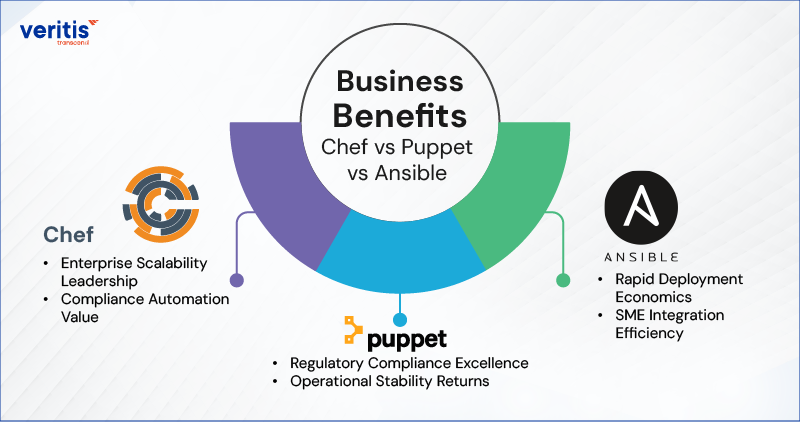
1) Chef Business Advantages
A) Enterprise Scalability Leadership
- Manages 50,000+ nodes in Fortune 500 deployments
- Chef config management reduces provisioning time from days to minutes
- 35% improvement in multi data centre consistency for global enterprises
B) Compliance Automation Value
- Automates SOC2, HIPAA, and PCI DSS compliance checks natively
- Reduces audit preparation time by 75% through policy as code
- $2.1M average savings per compliance violation prevented
2) Puppet Business Advantages
A) Regulatory Compliance Excellence
- 99% compliance automation for heavily regulated industries
- Built in reporting satisfies SOX, FINRA, and FDA requirements automatically
- 60% reduction in compliance audit costs through automated evidence collection
B) Operational Stability Returns
- 99.95% system availability maintained through declarative state management
- Chef Puppet and Ansible comparison shows Puppet leads in enterprise stability
- $3.2M annual savings from reduced downtime and incident response
3) Ansible Business Advantages
A) Rapid Deployment Economics
- Zero agent overhead eliminates 30% infrastructure management costs
- DevOps automation tools like Ansible achieve 50% faster proof of concept
- $150K to $500K saved annually on agent licensing and maintenance
B) SME Integration Efficiency
- Integrates with existing DevOps configuration tools without disruption
- 40% reduction in learning curve for development teams
- Enables automation tools for DevOps adoption across hybrid environments
Executive Decision Framework: ROI Driven Comparison
| Business Dimension | Chef | Puppet | Ansible |
| Speed to Value | 6 to 8 weeks of implementation | 8 to 12 weeks of enterprise deployment | 2 to 4 weeks for basic automation |
| Annual Licensing Cost | $1,500 to $3,000 per node | $200 to $500 per node monthly | $0 to $100 per node (support) |
| Team Training Investment | $2,000 to $5,000 per engineer | $3,000 to $7,000 per engineer | $2,500 to $6,000 per engineer |
| Risk Reduction Impact | 55% fewer configuration drifts | 60% compliance automation | 45% faster incident resolution |
Financial Impact Analysis for Chef, Puppet and Ansible
Cost Benefit Projections (3 Year Horizon)
1) Chef Investment Profile
- Initial Setup: $100K to $300K
- Annual Operating: $2M to $15M (for 1,000 node enterprise)
- 3 Year ROI: 285% for infrastructure intensive organizations
2) Puppet Investment Profile
- Initial Setup: $150K to $400K
- Annual Operating: $2.4M to $12M (for 1,000 node enterprise)
- 3 Year ROI: 320% for compliance heavy enterprises
3) Ansible Investment Profile
- Initial Setup: $50K to $200K
- Annual Operating: $0 to $1M (for 1,000 node enterprise)
- 3 Year ROI: 450% for cost sensitive mid market companies
Industry Specific Business Alignment for Chef, Puppet and Ansible
1) Financial Services
| Tool | Primary Benefit | Business Impact |
| Puppet | Regulatory Automation | $2.8M saved annually in compliance costs |
| Chef | Multi Data Centre Consistency | 99.9% uptime across global banking operations |
| Ansible | Rapid Security Patching | 70% faster vulnerability remediation |
2) Healthcare
| Tool | Primary Benefit | Business Impact |
| Chef | HIPAA Compliance Automation | $1.9M saved per avoided breach |
| Puppet | Patient Data Security | Zero configuration drift in EMR systems |
| Ansible | HITRUST Certification Support | 45% faster audit preparation |
3) Technology Sector
| Tool | Primary Benefit | Business Impact |
| Ansible | Developer Productivity | 50% faster environment provisioning |
| Chef | Microservices Orchestration | 40% improvement in deployment frequency |
| Puppet | SaaS Compliance Management | Automated SOC2 compliance maintenance |
Competitive Advantage Metrics for Chef, Puppet and Ansible
1) Time to Market Acceleration
- Chef: 60% faster infrastructure provisioning
- Puppet: 55% reduction in compliance delays
- Ansible: 70% faster developer onboarding
2) Risk Mitigation Value
- Chef: $2.4M average breach prevention savings
- Puppet: 99.95% system availability guarantee
- Ansible: 45% faster incident response times
3) Innovation Enablement
- Chef: Enables DevOps tools comparison and best tool selection
- Puppet: Supports the best configuration management tools in DevOps evolution
- Ansible: Facilitates automation tools for DevOps rapid experimentation
Chef vs Puppet vs Ansible: Which Tool is Best for Your Business Strategy?
The three configuration tools are simple yet facilitate robust capabilities to automate complex multi tier IT application environments.
Email-us: connect@veritis.com; Call: 972-753-0022

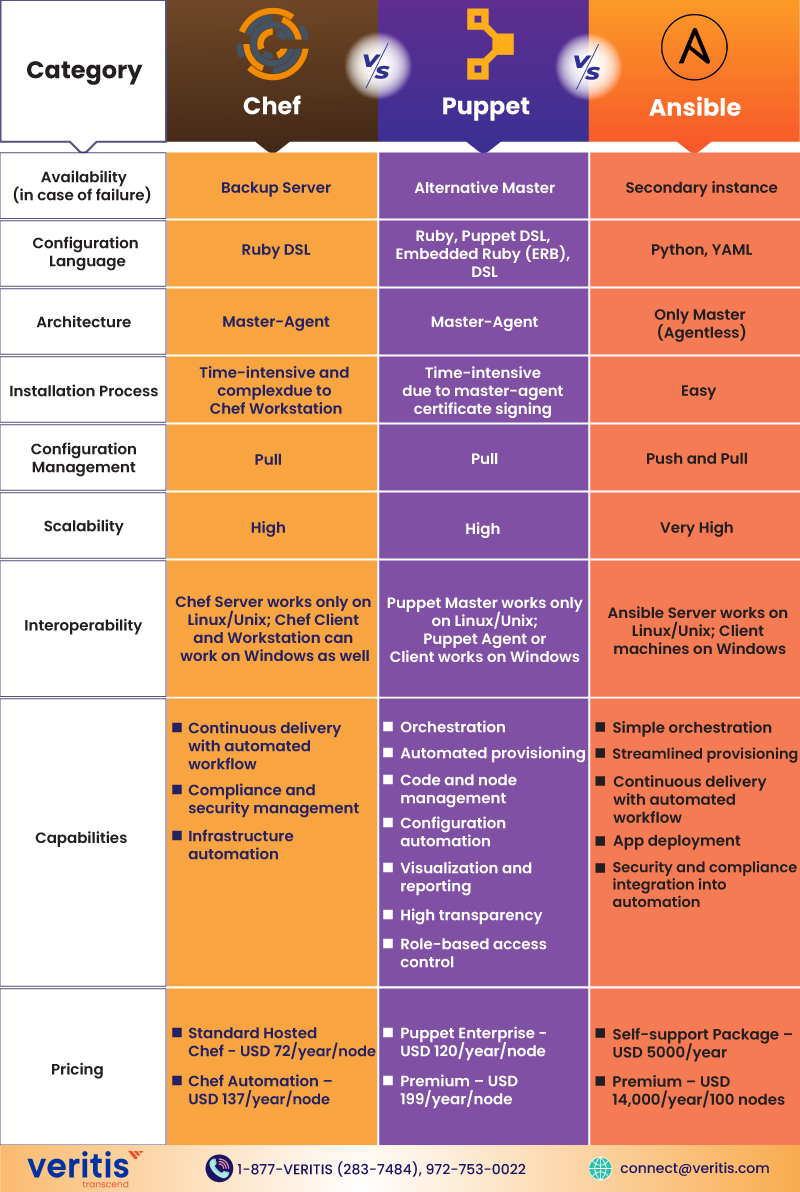
The distinctive difference between Ansible vs Puppet vs Chef is the underlying script. While Puppet is coded in Ruby, Ansible utilizes Python and YAML scripts, and Chef is built on Ruby like Puppet; however, in the Puppet Vs Chef differs from Puppet as it is programmed in Ruby, combined with Domain Specific Language. The other differences in Chef Vs. Puppet Vs. Ansible are portrayed based on different factors, including Availability, Configuration Language, Setup and Installation, Ease of Management, Scalability, Interoperability, Tool Capabilities, and Pricing.
1) Availability
The three configuration tools, Chef, Puppet, and Ansible, are available in case of a primary master or server failure. Every tool has the facility of a backup server or an alternative master to render support in case of a primary server failure.
| DevOps Tool | Availability (in case of server failure) |
| Chef | Backup Server |
| Puppet | Alternative Master |
| Ansible | Secondary instance |
2) Configuration Language
As indicated earlier, the configuration language in IT automation tools is one of the most distinctive differences. The configuration language plays a prominent role in determining the applications of configuration management tools in DevOps.
| DevOps Tool | Configuration Language | Suitable for | Learning Level |
| Chef | Ruby DSL | Developers | Difficult |
| Puppet | Ruby, Puppet DSL, Embedded Ruby (ERB), DSL | System Administrators | Difficult |
| Ansible | Python, YAML | System Administrators | Simple |
3) Setup and Installation
Regarding ease of setup and installation, Ansible outperforms Chef and Puppet due to its ‘agentless’ architecture. Chef and Puppet follow a master agent or master slave architecture.
| DevOps Tool | Architecture | Ease of Setup and Installation |
| Chef | Master Agent | Difficult and complex due to Chef Workstation |
| Puppet | Master Agent | Difficult due to certificate signing between the master and the agent |
| Ansible | Only Master (Agentless) | Easy |
4) Ease of Management
Managing the DevOps automation services depends on the language and configuration of the tools. There are two types of configurations: pull and push. A pull configuration involves pulling all configurations from a central server to the slave nodes without commands. In a push configuration, all configurations on the server are pushed to the nodes using specific commands.
YAML is considered the most straightforward configuration language because it is human readable and resembles English syntax. However, the Puppet DSL and Ruby DSL languages create setbacks for management.
Once again, Ansible demonstrates its dominance over the others in terms of management. It supports the YAML language and follows both push and pull configurations.
| DevOps Tool | Configuration | Ease of Management |
| Chef | Pull | Difficult |
| Puppet | Pull | Difficult |
| Ansible | Push and Pull | Easy |
Useful link: Top 10 DevOps Skills Every Aspiring DevOps Engineer Needs in 2025
5) Scalability
Scalability of the configuration tools is one of the primary factors enterprises consider when choosing a tool.
Chef, Puppet, Ansible can manage large infrastructures while handling the burden of scaling configurations. However, their scalability is slightly different due to the complexity of their configuration languages.
| DevOps Tool | Scalability |
| Chef | High |
| Puppet | High |
| Ansible | Very High |
6) Interoperability
Regarding interoperability, all three tools, Chef, Puppet, Ansible, have similar features. In three cases, all servers operate on Linux or Unix machines, while slaves or nodes run on Windows machines.
| DevOps Tool | Interoperability |
| Chef | The Chef Server should be on Linux/Unix; the Workstation and Chef Client support Windows. |
| Puppet | Puppet Master should be on Linux/Unix; Puppet Agent or Client supports Windows |
| Ansible | Ansible Server should be on Linux/Unix; Client machines support Windows |
7) Tool Capabilities
Reviewing the product capabilities in Ansible Vs Chef Vs Puppet can help you choose the most suitable tool for your requirements. Each tool has its own set of better capabilities.
| Product Capabilities | ||
| Chef | Puppet | Ansible |
|
|
|
8) Pricing
Pricing is prominent in decision making regarding configuration management tools or any product or technology.
| DevOps Tool | Pricing | Pricing |
| Chef | High | USD 13700/year for up to 100 nodes |
| Puppet | Medium | USD 11200 to 19900/year for up to 100 nodes |
| Ansible | Low | USD 10000/year for up to 100 nodes |
Strategic Recommendation Matrix for Chef, Puppet and Ansible
1) When to Choose Chef?
- Enterprise scale infrastructure (>10,000 nodes)
- Complex compliance requirements across multiple frameworks
- Need for granular control over Chef config management policies
- Long term DevOps automation tools investment horizon
2) When to Choose Puppet?
- Heavy regulatory compliance burden (finance, healthcare, government)
- Enterprise stability and 99.95% uptime requirements are paramount
- Existing configuration management tools in DevOps ecosystem integration
- Need for sophisticated DevOps configuration tools reporting
3) When to Choose Ansible?
- Rapid deployment and 50% faster time to value are essential
- Cost optimization and zero agent overhead priorities
- Hybrid cloud and automation tools for DevOps flexibility are required
- SME focused DevOps automation tools adoption strategy
4) Bottom Line Business Impact
Organizations implementing the best configuration management tools in DevOps achieve:
- 40 to 60% reduction in infrastructure management costs
- $1.2M to $3.5M annual value creation through operational efficiency
- 30x faster deployment frequency enabling competitive agility
- 60% improvement in system reliability and security posture
The Chef vs Puppet vs Ansible decision directly impacts your organization’s ability to compete in the digital economy. Each tool offers distinct business benefits that align with specific strategic objectives, making the right choice essential for success.
Real World Insights – Strengths and Pitfalls from Enterprise Users
Beyond documentation and marketing, enterprise teams rely on lived experience to guide tool adoption. Here’s a distilled look at what IT professionals are saying in forums, case studies, and peer reviews:
- Ansible is praised for its simplicity and YAML based playbooks, but users often report challenges with debugging complex playbooks and managing large scale SSH based deployments.
- Puppet earns points for its robust ecosystem tools, including PuppetDB and Bolt, although some report a steep learning curve and high setup complexity.
- Chef, while powerful in policy and compliance driven setups, is occasionally criticized for overly frequent deprecations and less intuitive onboarding.
Transparency about real world usability builds trust with IT decision makers evaluating tools at scale.
Case Study: Fortune 500 Financial Services Leader
Challenge:
A $45B financial institution faced escalating infrastructure management costs ($12M annually) and inconsistent deployment processes, causing quarterly outages. Manual provisioning created security vulnerabilities and compliance gaps, preventing regulatory approvals.
Solution:
Veritis implemented enterprise wide configuration management tools in DevOps strategy, including:
- Selection and deployment of Ansible for agentless infrastructure automation
- Integration with existing CI/CD pipelines and security scanning tools
- Implementation of automation tools for DevOps best practices for compliance reporting
- Staff training and knowledge transfer programs
Results:
- 65% reduction in infrastructure management costs ($7.8M annual savings)
- 80% improvement in deployment frequency (daily vs. weekly releases)
- Zero unplanned downtime for 18 months post implementation
- 95% faster compliance audit preparation and approval
- $2.1M in avoided security incident costs through automated patch management
This engagement demonstrates how strategic DevOps tools comparison and implementation transform operational challenges into competitive advantages while delivering measurable ROI.
For a complete overview, see the case study: DevOps Enterprise Management Support for Oil & Gas Service Provider.
Executive Decision Framework
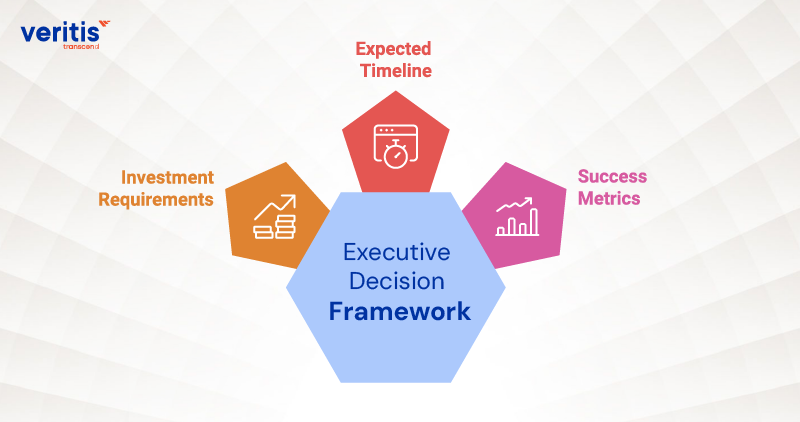
1) Investment Requirements
Typical enterprise Chef vs Puppet vs Ansible implementations require:
- Initial assessment and tool selection: $25K to $100K
- Implementation and deployment: $50K to $300K, depending on scope
- Ongoing optimization and support: $25K to $150K annually
2) Expected Timeline
- Tool evaluation and selection: 4 to 6 weeks
- Proof of concept: 2 to 4 weeks
- Full enterprise deployment: 3 to 9 months, depending on complexity
- Optimization and stabilization: Ongoing with quarterly reviews
3) Success Metrics
Track progress through:
- Deployment frequency improvement
- Mean time to recovery reduction
- System availability enhancement
- Operational cost per server decreases
- Compliance audit pass rate improvement
The Path Forward: Strategic Infrastructure Automation
The choice between Chef vs Puppet vs Ansible is not merely technical; it’s strategic. Organizations that invest in comprehensive configuration management tools in DevOps achieve superior operational performance, enhanced security postures, and accelerated innovation cycles.
Delaying this decision exposes enterprises to increasing technical debt, security vulnerabilities, and competitive disadvantage as cloud native competitors capture market share through superior agility and efficiency.
By partnering with experienced DevOps configuration tools consultants, enterprises can:
- Accelerate time to value by 4 to 6 months
- Reduce implementation risks by 50 to 65%
- Capture additional ROI through optimized deployment
- Focus internal resources on core business priorities
The best configuration management tools for your organization depend on specific requirements, team expertise, and strategic objectives, but the decision to act decisively determines future success.
Conclusion
The full potential of Chef puppet and ansible automation while minimizing risk and maximizing ROI? Veritis’ team of certified DevOps specialists brings proven methodologies and deep enterprise expertise to ensure your DevOps automation tools implementation delivers measurable business value.
Our track record includes successful configuration management tools in DevOps deployments across financial services, healthcare, manufacturing, and technology sectors, each achieving significant cost savings, performance improvements, and competitive advantages.
Schedule your complimentary DevOps automation assessment today and explore how Veritis can accelerate your infrastructure transformation journey while protecting your investment and ensuring success.
Learn more about our comprehensive DevOps automation services and connect with our team of certified DevOps specialists to discuss your specific requirements and timeline.