
Legacy on premises infrastructure can limit the agility of enterprises that need to move quickly while increasing data management costs. For IT leaders balancing regulatory compliance, latency requirements, and modernization priorities, Amazon Web Services hybrid cloud file transfer with AWS Storage Gateway provides a practical foundation for hybrid cloud storage services. It allows organizations to retain critical workloads on premises, move suitable data to the cloud, and manage both environments through unified cloud integration.
As part of a broader portfolio of cloud services and solutions, AWS Storage Gateway helps enterprises modernize storage without disrupting existing operations. This article explains how AWS Storage Gateway supports hybrid cloud file transfer, where it delivers the most value, and how to evaluate it against your organization’s architecture and business requirements.
What is AWS Storage Gateway?
Amazon Web Services (AWS) Storage Gateway is a hybrid cloud storage service that connects on premises environments directly to AWS Cloud storage. It enables on premises applications to use cloud storage, S3, FSx, and S3 Glacier through standard storage protocols, without requiring application rewrites or infrastructure overhauls.
At its core, AWS Storage Gateway functions as a software appliance or hardware device deployed in your data center. It caches frequently accessed data locally for low latency performance while durably storing the full dataset in AWS. The result: cloud scalability and cost efficiency without sacrificing the performance that on premises workloads demand.
For enterprise IT leaders evaluating a broader AWS cloud migration strategy, Storage Gateway is often the entry point, reducing risk by keeping critical workloads in place while progressively extending cloud capabilities.
Why AWS Storage Gateway is Built for Hybrid Cloud Realities?
Not every workload belongs in the cloud. Performance sensitive databases, regulated data sets, and latency dependent applications often must remain on premises. Yet those same environments need the scalability, durability, and cost structure that cloud storage offers for backup, archival, and disaster recovery.
AWS Storage Gateway resolves that tension. It extends cloud benefits elastic capacity, 11 nines of durability via Amazon S3, and pay as you go pricing to on premises environments without forcing a lift and shift migration.
Organizations exploring a hybrid cloud database strategy will find Storage Gateway a natural fit: it enables the data tier to span environments without sacrificing governance or performance consistency.
1) Enhancing Security and Connectivity
Security is non negotiable in hybrid architectures. AWS Storage Gateway encrypts all data in transit and at rest using AWS Key Management Service (KMS). Connectivity between your data center and AWS cloud services is established through either:
- AWS Site to Site VPN, dual encrypted tunnels, suitable for most enterprise environments
- AWS Direct Connect, dedicated private network connections for high throughput or compliance sensitive workloads
- Public Internet, available but generally unsuitable for regulated industries due to governance and compliance constraints
Two factor authentication on the AWS account, combined with IAM role based access controls, ensures that only authorized personnel can manage or access gateway resources.
2) Integration With On Premises Infrastructure
Deployment is straightforward. Storage Gateway is available as a VMware ESXi, Microsoft Hyper V, or Linux KVM virtual appliance, or as a hardware appliance for environments without a suitable hypervisor. Once deployed, it integrates with your existing storage protocols NFS, SMB, iSCSI so legacy applications interact with cloud storage without modification.
This compatibility matters. Organizations running Windows file servers, Unix workloads, or enterprise backup software can connect to AWS storage tiers without rewriting a single line of application code.
3) Considerations and Limitations
AWS Storage Gateway is powerful, but it is not universally the right tool for every scenario. Key constraints to evaluate:
- Windows ACL support: In Active Directory environments, the gateway supports a maximum of 10 Windows ACLs per file or folder and up to 50 shared folders per gateway.
- Latency dependency: Cached volume mode depends on network connectivity to AWS. Degraded WAN performance will affect access to non cached data.
- Throughput ceilings: Very high throughput block storage workloads may be better served by dedicated AWS storage services post migration.
- Egress costs: Frequent large volume data retrievals from AWS can accumulate data transfer costs; model your egress patterns before committing.
Understanding these limitations upfront prevents architectural mismatches. For organizations managing hybrid cloud security risks, a thorough pre deployment assessment is essential.
Four Gateway Modes: Matching Configuration to Use Case
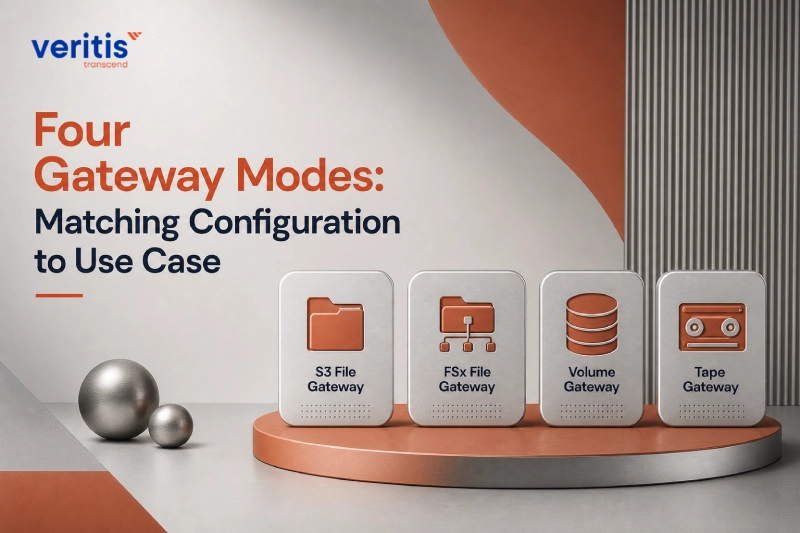
AWS Storage Gateway offers four distinct configuration modes. Selecting the right one is a strategic decision, not a technical afterthought.
1) S3 File Gateway
Provides NFS and SMB access to files stored as objects in Amazon S3. Applications interact with a familiar file interface while data is stored natively in S3, making it accessible to analytics, ML pipelines, and other AWS native services. Best for: file shares, content repositories, and data lakes feeding AWS analytics.
2) FSx File Gateway
Delivers low latency access to fully managed Windows file shares in Amazon FSx for Windows File Server. Ideal for branch offices and remote locations that need fast, local access to centrally managed file shares without maintaining on premises file server infrastructure. Best for: Windows environments requiring Active Directory integration and SMB protocol support.
3) Volume Gateway
Presents cloud backed iSCSI block storage volumes to on premises servers. Supports two modes:
- Cached Volumes: Primary data lives in AWS S3; frequently accessed data is cached locally. Reduces on premises storage footprint while maintaining low latency for hot data.
- Stored Volumes: Full dataset stored on premises; asynchronous point in time snapshots backed up to AWS as EBS snapshots. Best for workloads requiring full local access with cloud based disaster recovery.
Best for: databases, ERP systems, and applications requiring block storage with cloud based backup.
4) Tape Gateway
Emulates a virtual tape library (VTL) using Amazon S3 and S3 Glacier. Backup applications interact with virtual tapes using the same interfaces as physical tape, iSCSI, and VTL, without any software changes. Archived tapes are stored in S3 Glacier Deep Archive at a fraction of physical tape costs.
Best for: organizations replacing physical tape infrastructure and seeking lower cost long term archival.
Useful link: Choosing the Right AWS EC2 Instance Type for Your Application
Key Features of AWS Storage Gateway
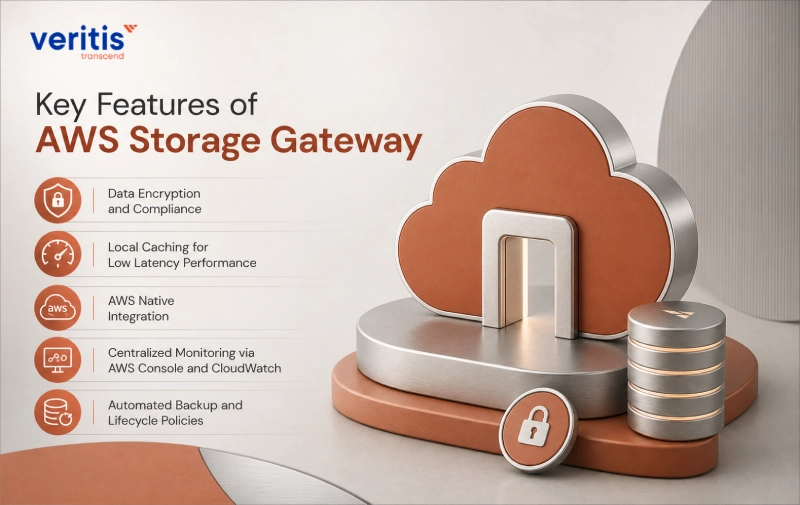
1) Data Encryption and Compliance
All data passing through AWS Storage Gateway is encrypted in transit using SSL/TLS and at rest using AES 256 encryption managed by AWS KMS. This supports compliance with HIPAA, PCI DSS, SOC 2, and other regulatory frameworks, a critical consideration for pharmaceutical, financial services, and healthcare enterprises.
2) Local Caching for Low Latency Performance
The local cache retains the most frequently accessed data on premises, ensuring that latency sensitive applications are not penalized for cloud storage. Cache size is configurable and should be sized based on working set analysis, typically 20% of total dataset volume for most enterprise workloads.
3) AWS Native Integration
Data stored through the gateway is immediately accessible to the full AWS ecosystem: S3, Athena, Redshift, EMR, Lambda, and more. This turns on premises data into a first class citizen for cloud native analytics, machine learning, and application development without requiring a separate migration step.
4) Centralized Monitoring via AWS Console and CloudWatch
All gateway metrics, cache hit ratio, throughput, latency, and upload buffer utilization are surfaced in Amazon CloudWatch. This gives IT operations teams full visibility without deploying additional monitoring tools. Alerts can be configured to trigger automated responses or notify on call teams. Organizations using AWS cloud management tools will find CloudWatch integration a natural extension of their existing observability stack.
5) Automated Backup and Lifecycle Policies
Storage Gateway integrates with AWS Backup for centralized, policy driven backup management. Lifecycle policies automatically move data between S3 storage classes Standard, Infrequent Access, Glacier based on access patterns, optimizing storage costs without manual intervention.
Benefits Over Traditional On Premises Storage
| Dimension | Traditional On Premises | AWS Storage Gateway |
| Capital expenditure | High upfront hardware costs | Pay as you go, no CapEx |
| Scalability | Manual hardware procurement | Elastic, on demand scaling |
| Durability | Dependent on local RAID/backup | 99.999999999% (S3) |
| Disaster recovery | Requires secondary site | Built in replication to AWS |
| Management overhead | High, including firmware, hardware, and tapes | Centralized, API driven |
| Data accessibility | Siloed on premises | Accessible across AWS services |
For executives evaluating AWS cost management, the shift from CapEx storage to an OpEx model is often the most immediately quantifiable benefit, particularly when physical tape and NAS replacement cycles are approaching.
1) Amazon Web Services Hybrid Cloud File Transfer
AWS Storage Gateway leverages AWS Direct Connect or VPN to ensure secure, high bandwidth data movement between environments. This supports large scale AWS data migration services use cases, including data center consolidation and workload migration, without the operational risk of ad hoc file transfer methods.
2) Cost Optimization at Scale
By tiering cold data automatically to S3 Glacier Deep Archive, priced as low as $0.00099 per GB per month, organizations can dramatically reduce the total cost of long term data retention compared to physical tape, NAS, or SAN based archives. The elimination of tape media procurement, offsite storage fees, and retrieval logistics compounds these savings significantly.
3) Data Protection
AWS Storage Gateway emphasizes robust data protection, integrating advanced security measures to safeguard valuable data against cyber threats and vulnerabilities. Built in encryption, both in transit and at rest, access controls, and seamless integration with AWS security services ensure comprehensive data security. These features enable businesses to comply with industry regulations and standards while maintaining the integrity and confidentiality of their data.
Use Cases for AWS Storage Gateway

1) Backup and Archive
AWS Storage Gateway is a proven replacement for physical tape backup infrastructure. Virtual tapes in S3 Glacier Deep Archive provide equivalent long term retention at a fraction of the cost, with faster retrieval times than physical tape recall from offsite vaults. Most enterprise backup platforms, Veeam, Commvault, Veritas NetBackup, support VTL interfaces natively.
2) Disaster Recovery
Volume Gateway’s stored volume mode continuously replicates on premises data to AWS as EBS snapshots. In the event of a site outage, snapshots can be launched as EC2 instances within minutes, restoring operations without relying on a secondary physical data center. This significantly reduces recovery time objectives (RTO) and recovery point objectives (RPO) compared to traditional DR architectures.
3) Data Migration
Storage Gateway simplifies the migration of large, complex datasets to AWS by providing a continuous, low disruption transfer path. Rather than a one time bulk migration, data is progressively moved to the cloud while applications continue operating on premises. This reduces migration risk and allows teams to validate cloud based workloads before decommissioning on premises systems. Planning things to consider before tailoring an optimal AWS cloud strategy should include evaluating Storage Gateway as a migration pathway.
4) Hybrid Cloud Workloads
Applications spanning on premises and cloud environments, common in regulated industries where data residency rules govern which data can leave a jurisdiction, benefit from Storage Gateway’s ability to present a unified storage interface across both tiers. Workloads can leverage local compute for latency sensitive processing while using cloud storage for capacity and durability.
5) DevOps and Testing Environments
Development and QA teams can provision storage resources on demand through the AWS API, enabling rapid environment spin up and teardown without waiting for infrastructure procurement. Lifecycle policies ensure test data is automatically cleaned up, preventing storage cost creep in non production accounts.
6) Analytics and Big Data Processing
Files stored via S3 File Gateway are immediately queryable by Amazon Athena, processable by EMR, and loadable into Redshift, without any additional data movement. This makes Storage Gateway an effective on ramp for organizations looking to build data lakes from on premises data sources.
Deployment Architecture: What to Plan Before You Begin
A successful Storage Gateway deployment requires upfront architectural decisions that downstream teams will live with for years. Key planning considerations:
1) Connectivity: Determine whether VPN or Direct Connect is appropriate based on throughput requirements and compliance posture. Direct Connect is strongly recommended for workloads exceeding 100 Mbps sustained throughput or subject to strict latency SLAs.
2) Cache sizing: Analyze your working set, the volume of data accessed within a rolling 24–72 hour window, and size the local cache to accommodate it. Under provisioned cache is the most common cause of performance issues post deployment.
3) Gateway placement: For branch offices or edge locations, consider the hardware appliance option where VMware or Hyper V infrastructure is not available.
4) IAM and security posture: Define IAM roles and bucket policies before deployment. Apply the principle of least privilege; each gateway should have access only to the specific S3 buckets or FSx file systems it requires.
5) Monitoring baseline: Establish CloudWatch dashboards for cache hit ratio, upload buffer fill percentage, and network throughput from day one. These metrics are the primary indicators of gateway health and capacity planning signals.
Useful link: Why the AWS Cloud Adoption Framework (CAF) is Key for a Successful AWS Migration
Case Study: Hybrid Cloud Storage Transformation for a Global Pharmaceutical Leader
A global pharmaceutical firm needed to modernize its data storage architecture, bridging on premises systems with scalable cloud storage while maintaining compliance with pharmaceutical data governance standards.
Challenge: Legacy on premises infrastructure constrained R&D data access, limited scalability for large clinical trial datasets, and inflated storage costs as data volumes grew.
Veritis Approach: Deployed AWS Storage Gateway to integrate the client’s on premises storage environment with Amazon S3 and S3 Glacier. Automated data synchronization, backup, and recovery workflows replaced manual processes. Encryption and access controls were configured to meet 21 CFR Part 11 and GDPR requirements.
Quantified Results:
- Storage cost reduction: Cold data migrated to S3 Glacier Deep Archive, reducing long term retention costs by over 60% compared to on premises NAS
- Operational efficiency: Automated backup workflows eliminated an estimated 15 hours per week of manual storage administration
- Recovery time: Disaster recovery RTO reduced from 8+ hours to under 45 minutes through EBS snapshot based recovery
- Compliance: 100% of data flows encrypted in transit and at rest, satisfying regulatory audit requirements without additional tooling
This engagement demonstrates that AWS Storage Gateway, properly architected and integrated, delivers measurable outcomes in cost, operational efficiency, and compliance posture in data sensitive industries.
Explore the full case study: Cloud Computing Services for the Pharmaceutical Industry.
Conclusion: A Strategic Entry Point for Hybrid Cloud Modernization
AWS Storage Gateway is not a transitional workaround; it is a production grade hybrid cloud architecture component used by thousands of enterprises globally. Its value is highest for organizations that cannot fully migrate to the cloud in a single motion: those with regulated data, latency sensitive workloads, or significant existing on premises investments.
For enterprise IT leaders, the strategic case is straightforward. Storage Gateway eliminates the binary choice between on premises control and cloud scalability. It reduces backup infrastructure costs, strengthens disaster recovery posture, and turns on premises data into a first class input for cloud native analytics, all without requiring application rewrites or disruptive migrations.
Veritis, recognized by the Globee Business Awards and American Business Awards winner, brings deep AWS implementation expertise to hybrid solutions storage engagements. From architecture assessment through deployment and ongoing optimization, Veritis helps enterprise clients extract measurable value from AWS Storage Gateway, on time, in scope, and in compliance.
Ready to determine whether AWS Storage Gateway is the right fit for your hybrid cloud architecture? Schedule a conversation with our AWS specialists to explore how our hybrid cloud services can support your storage and modernization goals.